Command Line Tools#
Nokia Event-Driven Automation (EDA) exposes three north-bound APIs to its users:
- Kubernetes API
- REST API
- gRPC API
A number of industry-standard and custom-built CLI tools work on top of the offered APIs, such as:
edactloperates on top of the gRPC API and offers a comprehensive suite of commands tailored for Nokia EDA.kubectlandk9sfrom the Kubernetes ecosystem make use of the K8s API and allow users to manage the underlying Kubernetes cluster as well as Nokia EDA resources.- Various custom CLI tools have been developed internally and externally that make use of the Nokia EDA REST API.
You have already used the Kubernetes API and the Nokia EDA's gRPC API when you managed EDA resources using the kubectl and edactl tools in the Tour of Nokia EDA. And you interacted with the platform's REST API when you, for example, opened the EDA UI in your browser or used Ansible or Terraform to manage EDA resources.
In addition to EDA-specific CLIs, users get to benefit from the vast ecosystem of tools available in the Kubernetes ecosystem. We will cover some of such tools in this section as well.
You will find the majority of the tools already downloaded as part of the installation process and located in the ./tools directory in the Playground repository. To make these tools available in your shell, add the Playground's directory containing the binaries to your shell's $PATH.
Assuming your Playground repository is located at ~/nokia-eda/playground, add the following line to your shell configuration file:
Restart your shell to apply the changes.
Check if the tools are available in your shell by running:
If the tools are not available, check your shell configuration file for the correct path.
Most of the tools are also available in the
eda-toolboxpod.
kubectl#
kubectl is the CLI to reach for when interacting with Kubernetes. EDA users typically use it to manage and operate the underlying Kubernetes cluster and its components.
The kubectl requires a Kubernetes configuration (called kubeconfig) file to operate. This file is fetched from the K8s cluster as part of the Kubernetes installation process or automatically provisioned if the Try EDA installation is used.
While
kubectlcan also be used to manage EDA resources, it is not the preferred tool for doing so as it can't apply multiple resources in a single transaction.
If the correct kubeconfig file is obtained and available in your shell's $KUBECONFIG environment variable, you can verify kubectl is working by running:
If the nodes are listed, your kubectl is correctly configured.
edactl#
edactl is a swiss-knife for EDA users, the go-to tool for managing resources, scripting, running queries, creating branches, scheduling workflows, running synthetic traffic tests, and automating pipelines with EDA.
It offers a comprehensive suite of commands that enable users to interact with a wide array of features and capabilities of the platform.
Available Commands:
  aaa          aaa user command
  alarms       List alarms or details of a specific alarm
  apply        Apply a configuration to a resource by file name or stdin
  branch       Branch operations
  certificates Certificate related commands
  completion   Generate the autocompletion script for the specified shell
  config       Interactions with EDACONFIG
  create       Create a resource from a file or from stdin
  delete       Delete resources by file name
  dhcp         DHCP related commands
  edge-if-ping Ping from an edge interface
  get          Displays one or many resources
  git          Git related commands
  help         Help about any command
  intent       intent
  labels       Display the label key/values in use
  mergerequest List merge requests
  namespace    Display active namespaces
  node         Node related commands
  patch        Update fields of a resource using JSON patch
  platform     Show cluster status and platform related commands
  query        Run an EQL query
  replace      Replace a resource by file name or stdin
  schema       Print Json Schema for given path
  sdk          Manipulate EDA sdk
  sub          Subscribe to state updates
  testman      testman related commands
  transaction  List transaction results
  workflow     Workflow related commands
Before you can use edactl, you need to fetch its configuration file from the Kubernetes cluster, and for this you need to have a valid kubeconfig file available. If you have done the kubectl configuration you can proceed to fetch the edactl configuration file with the following command:
The edactl configuration file is written to ~/.eda/config.yml by default and resembles kubeconfig in its structure. To ensure that edactl is configured correctly, run the following command:
If the edactl platform command returns the platform information, you are ready to use edactl to its full potential. In case the command does not work, inspect the edactl config file that contains the external address of the eda-api service and the port (51206 by default) the grpc api proxy listens on. Make sure the address and port are correct and the service is reachable.
It is recommended to add the e alias for edactl to your shell configuration file to make it easier to use:
Shell completions
edactl acts as a drop-in replacement for kubectl when used for EDA resource management. The get, apply, replace, delete, and patch commands are supported and work similarly to their kubectl counterparts. To assist you with the commands and objects hierarchy, edactl provides shell completions for the common shells.
Ensure that bash-completion is installed on your system.
To load completions for the current session:
To load completions for each session:
To also autocomplete for the e command alias, add the following to your .bashrc or .bash_profile:
If shell completion is not already enabled in your environment you have to enable it by ensuring zsh completions are loaded. The following can be added to your zshrc:
To load completions for each session generate the completion script and store it somewhere in your $fpath:
edactl completion zsh | \
sed '1,2c\#compdef edactl e\ncompdef _edactl e' > \
~/.oh-my-zsh/custom/completions/_edactl
Completion script location
The example above uses the ~/.oh-my-zsh/custom/completions directory, which might not exist by default.
echo $fpath will show the directories zsh reads files from. You can either use one of the available completions directories from this list or add a new directory:
and then add this directory to the fpath list by adding it in your .zshrc file:
Now you can use ~/.oh-my-zsh/custom/completions for your completions as shown above.
Start a new shell for this setup to take effect.
k9s#
k9s is a TUI for Kubernetes clusters that you can see in many of our demos. Once in a while you would want to inspect the state of your cluster in a more graphical way than just using kubectl - that is when k9s comes in handy.
e9s#
e9s is the Terminal UI (TUI) for EDA and can help you interact with the platform similar to how you'd use the famous k9s for Kubernetes.
It comes preinstalled in the eda-toolbox pod. You can either connect to the toolbox pod1 and execute the utility directly from there, or you can setup a handy alias (for example in your ~/.zshenv) to make it easily accessible.
alias e9s='kubectl -n eda-system exec -it $(kubectl -n eda-system get pods \
-l eda.nokia.com/app=eda-toolbox \
--field-selector=status.phase=Running \
-o jsonpath="{.items[0].metadata.name}") \
-- sh -c "TERM=xterm-256color e9s"'
And behold the power of e9s!
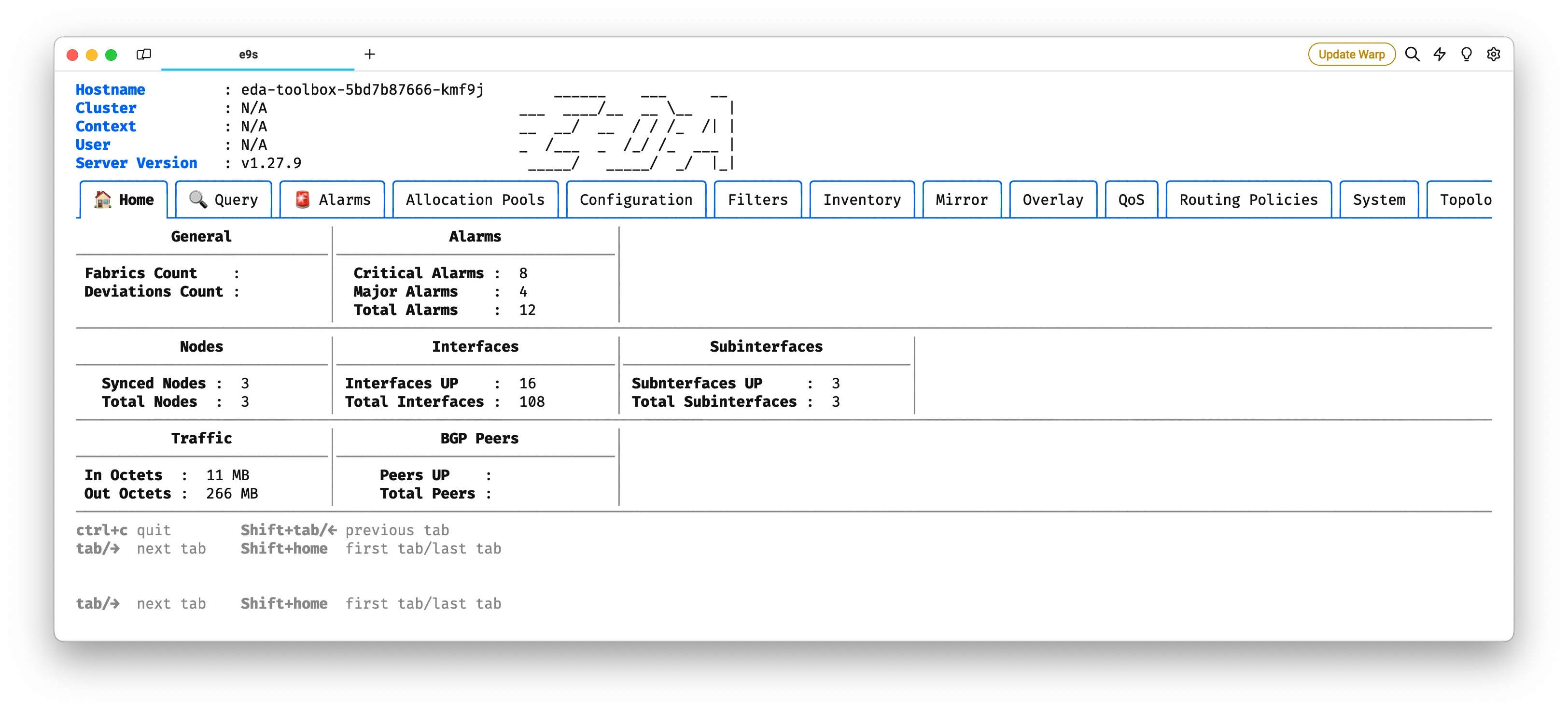
Here is a quick demonstration on how to use the powerful EDA Query Language (EQL) to run queries in e9s:
lnav#
EDA is composed of many microservices, and it is often useful to have a log viewer to quickly inspect the logs distributed across the pods.
The log aggregation that EDA uses is based on fluentbit/fluentd combination with the logs aggregated in the eda-fluentd deployment. To browse the logs you can use the lnav CLI you would find in this deployment.
For convenience, you can set up an alias to quickly access the TUI logs viewer:
alias edalogs='kubectl -n eda-system exec -it $(kubectl -n eda-system get pods \
-l eda.nokia.com/app=fluentd -o jsonpath="{.items[0].metadata.name}") \
-- sh -c "TERM=xterm-256color lnav /var/log/eda/*/*/*.log"'
helm#
Helm is one of the many package managers for Kubernetes. You might want to add it to your PATH to install additional apps and deployments on your cluster. For example, you may install the NetBox stack and test EDA<->NetBox integration, all done in a single cluster.
-
You can log in to the
eda-toolboxpod using the following alias:↩alias edatoolbox='kubectl -n eda-system exec -it "$(kubectl -n eda-system get pods \ -l eda.nokia.com/app=eda-toolbox \ --field-selector=status.phase=Running \ -o jsonpath="{.items[0].metadata.name}")" -- env TERM=xterm-256color bash -l'