Resources#
In Nokia Event-Driven Automation (EDA), a resource is a unit of automation and can represent virtually anything:
- an interface on a network device
- a complete fabric configuration
- a network service like a VPN or a VRF
- and even non-network related resources like a user account, a DNS record, or a firewall rule.
As a Kubernetes citizen, Nokia EDA represents its resources using Custom Resources (CRs) of Kubernetes that can be created using multiple methods including the Kubernetes (K8s) API, the Nokia EDA API, or through the Nokia EDA UI. By using CRs, Nokia EDA also implements the Kubernetes Resource Model, or KRM.
The KRM defines how Kubernetes resources are described, created, updated, and monitored. Kubernetes resources consist of a combination of fields that describe their state and behavior within the cluster.
In Kubernetes, a resource is any object the Kubernetes API can create and manage. These resources represent various entities, such as Pods, Services, Deployments, ConfigMaps and so on., which are essential for orchestrating containerized applications.
Every resource in Kubernetes is defined using a standard structure that includes metadata, a spec, and a status. Where:
metadataprovides unique identifiers and metadata for resources.specprovides the specification for the resource - its configuration.statusprovides an interface for the controller/resource to publish relevant information back to the user/operator.
Derived resources#
As part of the execution of a transaction, Nokia EDA applications sometimes generate a set of resources. These resources are not "owned" by the user or operator; instead, they owned by the application that generated them. To ensure the ongoing operation of the owning application, such resources can only be changed by that same application.
In Nokia EDA, such a resource is known as a derived resource; it is a resource whose entire content is derived from some other resource.
The Nokia EDA GUI prevents you from modifying or deleting derived resources. To indicate that a resource is derived and cannot be modified or deleted, derived resources are presented as read-only, and the usual modification actions are restricted; for example, Nokia EDA does not allow you to use a Delete action to delete a derived resource. Unavailable actions are grayed out in action lists.
In data grids, rows displaying derived resources are include a lock icon to indicate that those resources cannot be modified or deleted.
Resource Topology #
Because the volume of resources and their relationships within Nokia EDA can be very large, the Nokia EDA UI provides a topology visualization of derived and parent resources to help understand and navigate between the interconnections.
To see the topology view for a resource, open the Details view for an individual resource, and then select Topology from the drop-down list of available views.
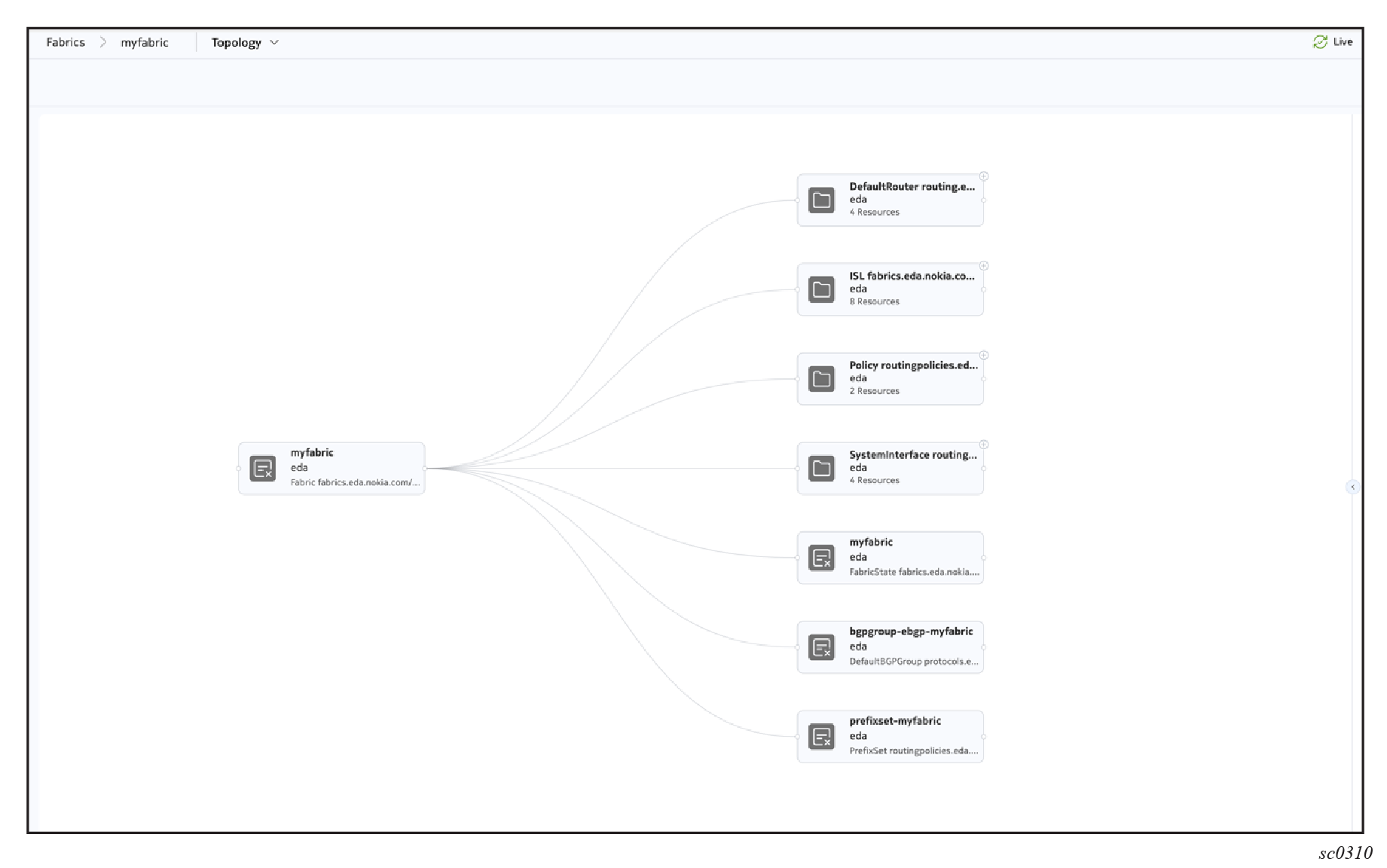
For example, the following illustration shows the resource topology for a fabric. It shows not the fabric's physical topology, but its connection to the set of other resources configured within Nokia EDA:
- Default Routers
- ISLs
- Routing Policies
- System Interfaces
- BGP Groups
- Prefix Sets
Related targets #
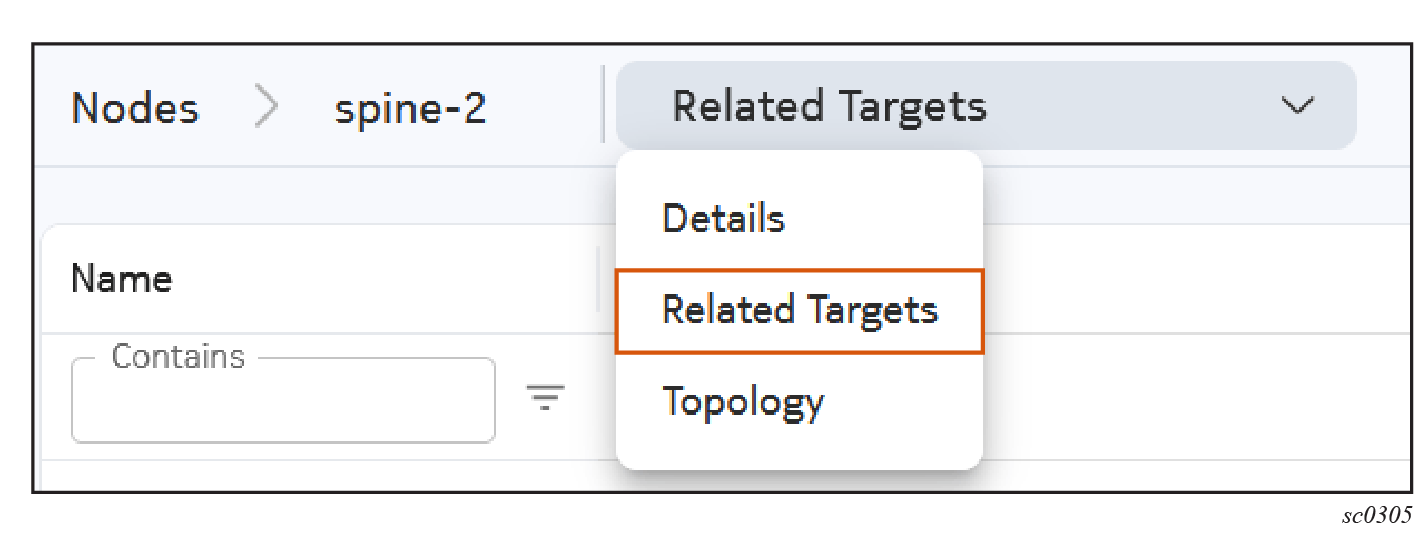
When viewing a resource in the EDA UI, the Related targets view allows you to view a list of targets where the selected resource's intent generated a part of the target's configuration.
Note
The Related targets view does not account for read relationships between resources. For example, BGP group resources do not have any related targets because the BGP configuration of the target is generated by a different resource intent which reads the BGP group resource as an input.
You can switch to the Related targets view by selecting Related targets from the drop-down list at the upper right of the page.
Labels #
Nokia EDA uses labels to organize and describe resources. Labels are among the metadata common to all resources in Nokia EDA. In the Nokia EDA UI, labels can be viewed and entered in the Metadata panel for a resource.
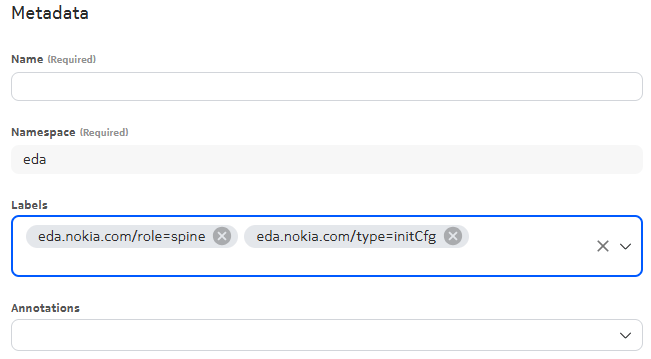
A label consists of two pieces of information: a key, and a value. Labels are limited to key-value pairs of small size and are designed for simple, static values. For example:
- app=frontend
- version=v1.0
- environment=prod
The key can include up to 253 characters if using the DNS subdomain format (<domain>/<key>=<value>), and the value can include up to 63 characters.
Label changes are considered normal changes for the purposes of transactions. A label change can trigger execution of configuration intent scripts and if executions are successful, their changes are persisted to Git.
Labeling resources#
In the Nokia EDA UI, labels can be added in the Label field under the heading Metadata of the resource edit form.
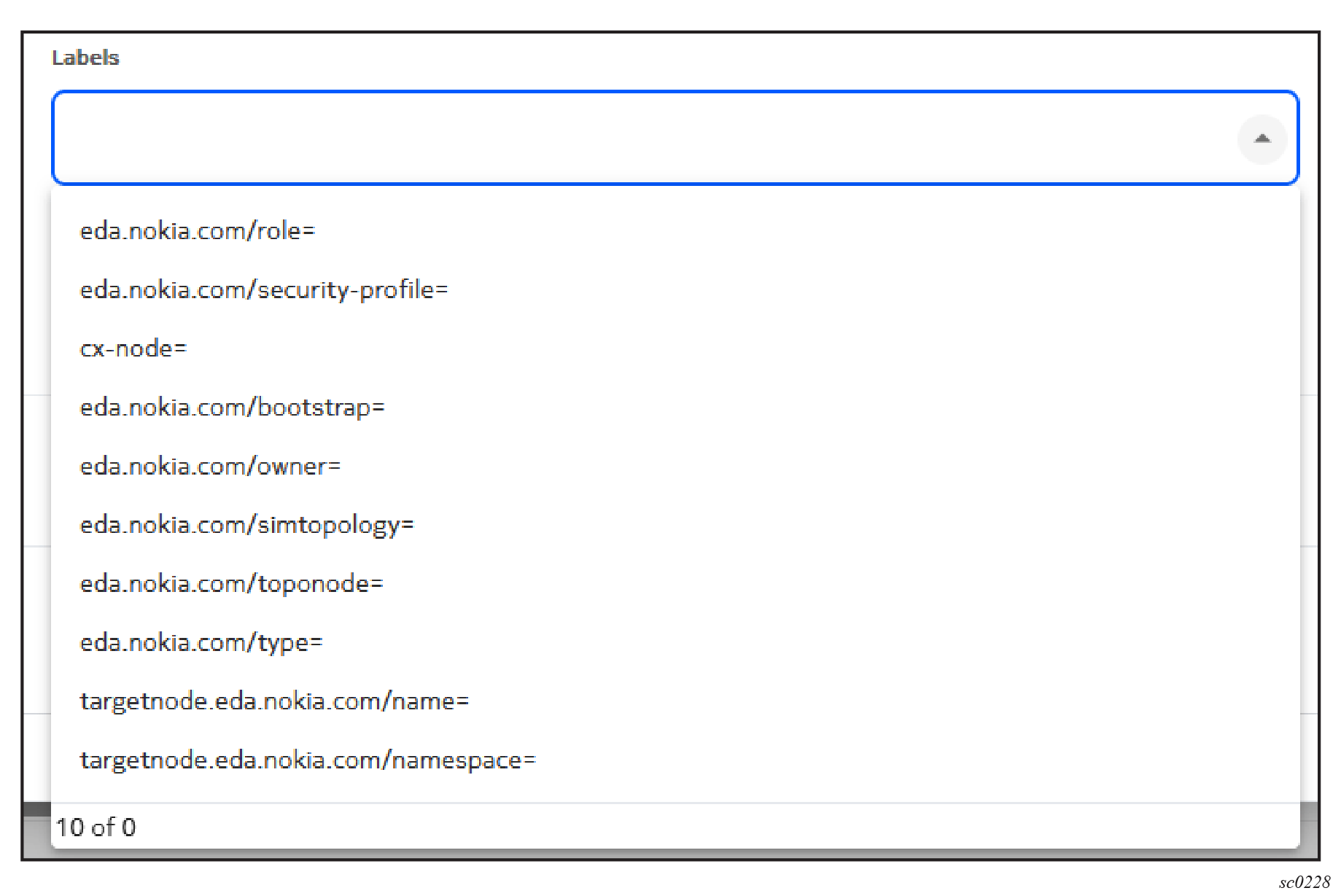
The UI will autocomplete from existing label keys and values. Type the first few letters of a label you are looking for; the list filters to show only the labels that match the text provided. The autocomplete lists labels from the same resource kind first, and then labels from all resource kinds.
Label selectors#
Labels are particularly useful for selecting objects; for example, you can use a label to indicate which interfaces a service should be configured on. The following illustration shows a segment of a fabric configuration in which participating leaf nodes are selected among those that possess the label "role" and its value is "leaf".
Note
Label selectors in Nokia EDA work slightly differently from label selectors in Kubernetes. In particular, Kubernetes objects typically use the metav1.LabelSelector Go struct in order to select labels of a certain resource type. This LabelSelector is not supported in Nokia EDA.
Instead, Nokia EDA uses an array of one or more expressions to select labels. Each string can contain one or more comma-seperated selectors expressions; the comma acts as a logical AND (similar to Kubernetes' LabelSelector). Multiple labels selectors in the array act as a logical OR.
A selector supports various operators, including but not limited to =, !=, in, notin. Some examples:
app=catmeans a resource is only returned if it has a label present namedapp, with a value ofcat.app in (cat)is another way of writing the above, meaning a resource is only returned if it has a label namedappwith a value ofcat.appreturns a resource if it has a label present with the nameapp, with any value including an empty value.!appreturns a resource if it does not have a label present with the nameapp, with or without a value.app in (cat, dog)returns a resource if it has a label present with the nameapp, with a value ofcatORdog.app in (cat, dog),env in (prod, demo)returns a resource if it has both a label namedappwith valuescatORdog, AND a label namedenvwith valuesprodORdemo.app notin (elephant, rhino)returns a resource if it does NOT contain a label namedappwith a value of eitherelephantORrhino.app=cat,env=prodreturns a resource if it has a label namedappwith the valuecat, AND a label namedenvwith valueprod.
Label selector previews#
When editing or creating a resource that uses a label selection, Nokia EDA UI can display a preview of the resources that match your selector.
In the example below, the resource selects which nodes to apply its configuration by using label selector in the field Target Selector. After entering a selector in the Target Selector field, click the Preview Target Selector icon to open the Target Selector form. This displays all nodes matching the label selector.
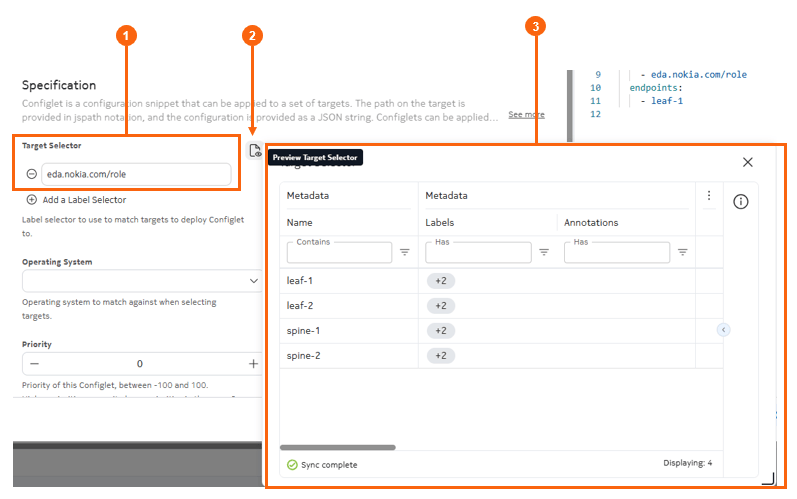
Table: Elements of the label selector preview
| Property | Description |
|---|---|
| 1 | The Target selector field, with the "eda.nokia.com/role" label selector |
| 2 | The Preview Target Selector icon |
| 3 | The Target Selector form, showing all Node resources with a "eda.nokia.com/role" label |
Annotations#
Like labels, annotations are metadata about a resource consistent of key-value pairs.
Nokia EDA uses annotations to organize and describe resources. Annotations are among the metadata common to all resources in Nokia EDA. Annotations are similar to labels, but are used for different purposes.
However, annotations values are not subject to the same length restrictions as labels. Annotations can store lengthy information that resembles the information contained in labels, but frequently overruns labels length restrictions. Annotations are typically used to store arbitrary data like configuration details, URLs, object tracking information, or any other information that does not need to be part of Kubernetes’ or Nokia EDA's logic.
Annotations are not used for selection. Annotations are more informational; and although they are not used by Nokia EDA's resource selection systems, they can still be useful to external systems, people, or automation tools.
Examples of possible annotations values:
author=team-namedescription="Stores the last applied configuration of a resource for use by kubectl apply"
Annotation changes are considered normal changes for the purposes of transactions. They trigger execution of configuration intent scripts, and if executions are successful, their changes are persisted to Git. However, there are a small number of exceptions; Nokia EDA does not trigger, monitor, or persist any annotations with the following keys:
core.eda.nokia.com/failed-transactioncore.eda.nokia.com/running-versionkubectl.kubernetes.io/last-applied-configuration
Annotating resources#
In the Nokia EDA UI, labels can be added in the Annotations field under the heading Metadata of the resource edit form.
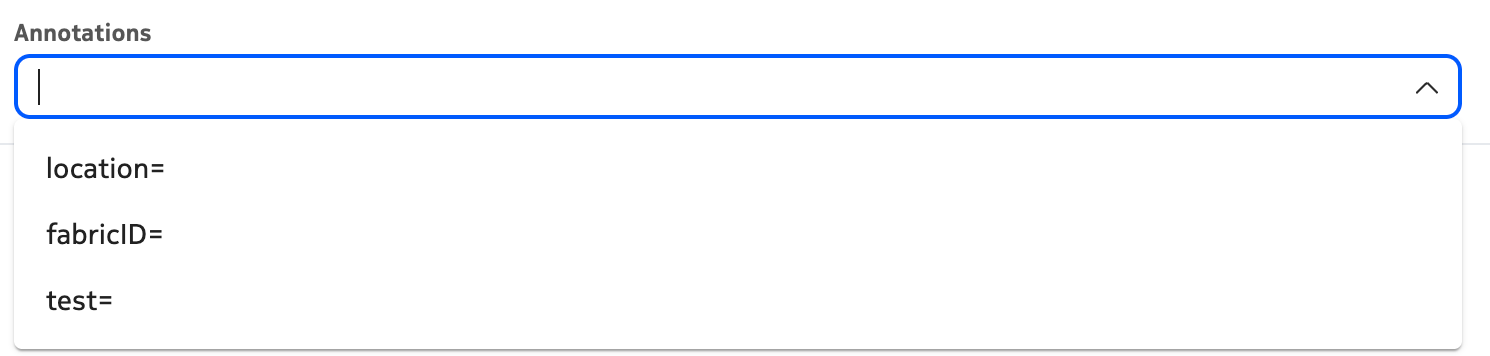
The UI will autocomplete from existing label keys and values. Type the first few letters of a label you are looking for; the list filters to show only the labels that match the text provided.