VLAN#
Virtual Networks → VVLANs
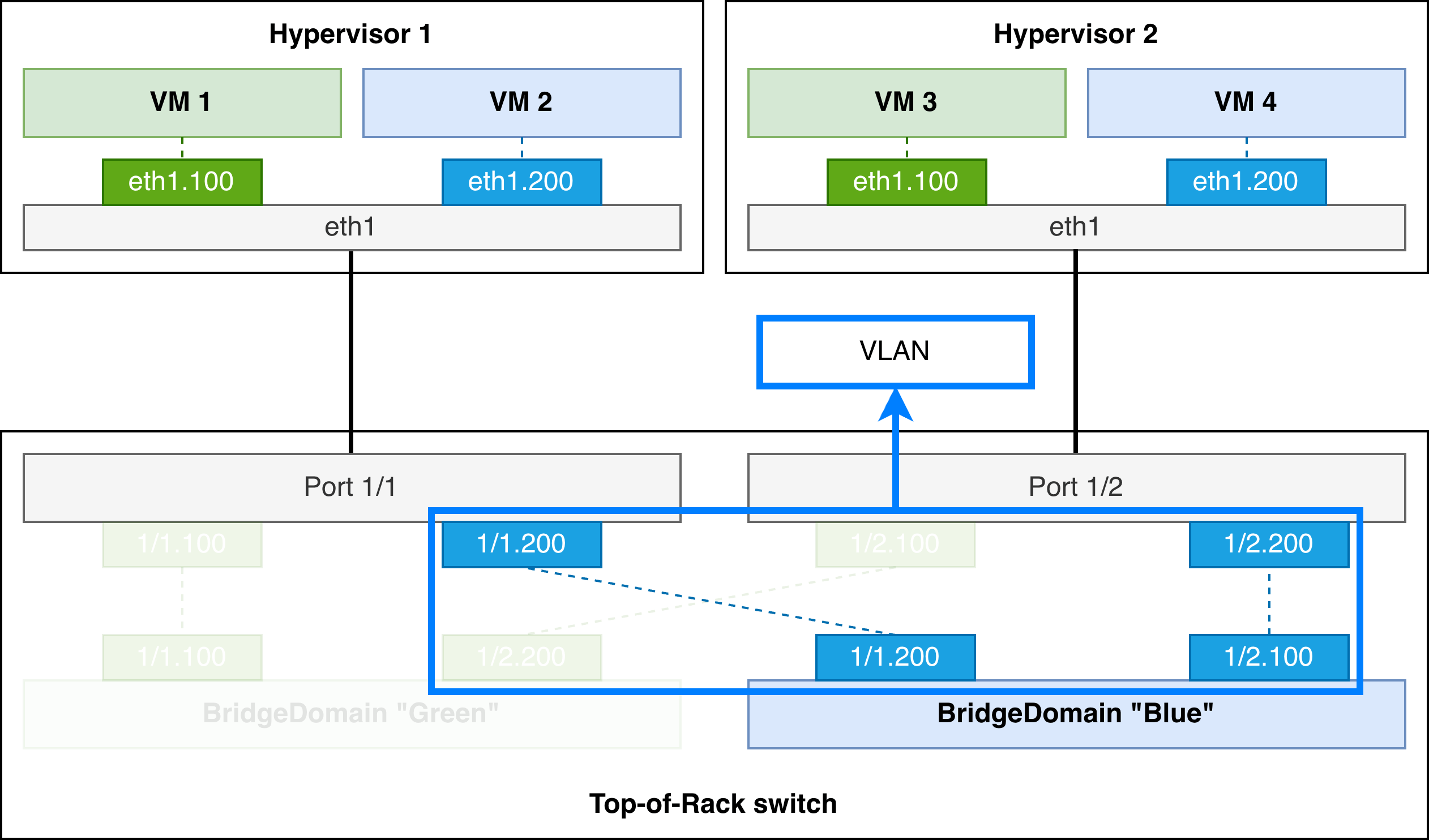
A VLAN combines a set of Interfaces with a VLAN tag to create sub-interfaces, which are then connected to a BridgeDomain. This way, the hosts that are connected to these sub-interfaces can communicate amongst themselves and with other hosts in the BridgeDomain.
VLAN vs BridgeInterface
A VLAN uses labels to select which Interfaces are connected to the BridgeDomain, while a BridgeInterface connects a single Interface to the BridgeDomain. The former should be preferred wherever possible.
Traffic is switched via the BridgeDomain that matches the VLAN tag that the packets are tagged with, which allows a physical device to communicate with multiple services over the same physical interface.
A common use case is a server that hosts virtual machines: the physical device (hypervisor) hosts multiple VMs, all of which are assigned a unique VLAN ID to be able to connect to the network over the same physical interface.
Split-horizon groups#
Split-horizon groups are used for loop avoidance, grouping all interfaces selected by this VLAN. BUM traffic received through one of these Interfaces is not forwarded to any other VLAN sub-interface local to that physical switch. Note that sub-interfaces on a different switch may still receive the packets.
Split-horizon groups are typically used in scenarios where a set of interfaces may be inter-connected through a backdoor link, and in certain multihomed scenarios.
Split-horizon groups for multi-homing
Rather than creating a split-horizon group for interfaces that are used for all-active multi-homing, prefer using an EVPN Ethernet Segment wherever possible. Dedicated loop-avoidance features are built into the EVPN protocol that are superior to split-horizon groups.
Ethernet segments also provide loop avoidance when the links are connected to different physical switches, which is not possible with split-horizon groups.
Uplinks#
An uplink in the context of the VLAN is a connection between a breakout switch and a service-aware switch. The breakout switch usually has fewer capabilities, both in terms of port speeds as well as control plane functionality.
These switches are typically not VxLAN or MPLS capable, and the distributed BridgeDomain can therefore not be extended onto the access switch. Instead, a separate non-distributed bridge domain service is created on the breakout switch which is attached to the distributed BridgeDomain through the uplink.
The uplinkSelectors label selector property is used to identify which links are connected to breakout switches. The VLAN that is used on this breakout uplink is determined by the uplinkVLANID or uplinkVLANPool property.
Note
On the breakout switch, only the interfaces selected by the VLAN will be attached to the bridge domain service.
Dependencies#
BridgeDomain#
The VLAN connects a set of Interfaces to a BridgeDomain, allowing the hosts that are behind the Interfaces to communicate with each other and to other hosts in the BridgeDomain.
The BridgeDomain must exist before the VLAN can be configured.
Referenced resources#
Interface#
A VLAN is mapped to multiple Interfaces, and those Interfaces can be referenced by many VLANs. A VLAN tag is used to determine which service the traffic will be forwarded to.
Although the label selector that selects Interface resources for this VLAN must be specified, there is no requirement that the label is actually applied to any Interface. If the VLAN selects no Interfaces, it will not be deployed.
TopoLink#
If an uplink is configured which connects a set of Interfaces on one or more breakout switches to the distributed BridgeDomain service, the uplink label selector selects TopoLink resources that are used to connect the breakout switch(es) to the rest of the network.
Examples#
Custom Resource Definition#
To browse the Custom Resource Definition go to crd.eda.dev.
VLAN
SPEC
The VLAN enables the configuration and management of VLAN and their association with BridgeDomains. This resource allows for specifying the associated BridgeDomain, selecting interfaces based on label selectors, and configuring VLAN IDs with options for auto-allocation from a VLAN pool. It also supports advanced configurations such as ingress and egress traffic management, and overrides for MAC Duplication Detection actions when enabled in the associated BridgeDomain.
-
Reference to a BridgeDomain or SimpleBridgeDomain.
-
The description of the VLAN.
-
Interfaces to use for attachment to this VLAN based on the label selector. Selects Interfaces based on their associated labels.
-
L2 MTU specifies the maximum sized Ethernet frame that can be transmitted on the subinterface. If a frame exceeds this size it is discarded. If the l2-mtu of the subinterface exceeds the port-mtu of the associated interface, the subinterface will remain operationally down.
format: int32range: 1450 to 9500 -
If Mac Duplication Detection is enabled on the associated Bridge Domain, this property will override the MDD action set in the BridgeDomain.
enum: "Blackhole", "OperDown", "StopLearning", "BridgeDomainAction" -
Name of the Split Horizon Group to be used for this VLAN. All subinterfaces within this VLAN will be members of this Split Horizon Group.
-
The Uplink between your access breakout switch and your leaf switch.
-
Selects TopoLinks which connect a leaf switch to a breakout switch. This is the uplink between your access breakout switch and your leaf switch. There can only be a single TopoLink between the access breakout switch and the leaf switch, if more than one TopoLink is present between two devices the transaction will fail.
-
The VLAN ID to be utilized to isolate traffic from the VLAN on the access breakout switch to the leaf switch on the selected uplink TopoLink.
default: "pool" -
A VLAN from this pool will be utilized to isolate traffic from the VLAN on the access breakout switch to the leaf switch on the selected uplink TopoLink.
-
Single value between 1-4094 support, ranges supported in the format x-y,x-y, or the special keyword null, any, untagged or pool for auto allocation.
default: "pool" -
Reference to a VLAN pool to use for allocations. [default="vlan-pool"]
STATUS
-
Indicates the health score of the VNET.
format: int32range: <= 100 -
Indicates the reason for the health score.
-
The time when the state of the resource last changed.
-
Total number of sub-interfaces configured by the VNET.
format: int64 -
Total number of sub-interfaces configured by the VNET which are oper-down.
format: int64 -
Operational state of the VNET.
enum: "Up", "Down", "Degraded", "Unknown" -
List of members in this Interface.
-
-
The administrative status of the SubInterface.
-
Normalized interface name.
-
Eda interface resource.
-
Indicates when this SubInterface last changed state.
-
Reference to Node object.
-
Node specific interface name.
-
Operating System of the Node.
-
Indicates the current operational state of the SubInterface.
enum: "Up", "Down", "Degraded", "Unknown" -
Index allocated to the subinterface on the associated interface for the given VLAN.
format: int64 -
vlan assigned to this subinterface.
-
-
-
List of uplinks in this Interface.
-
-
The administrative status of the SubInterface.
-
Normalized interface name.
-
Eda interface resource.
-
Indicates when this SubInterface last changed state.
-
Reference to Node object.
-
Node specific interface name.
-
Operating System of the Node.
-
Indicates the current operational state of the SubInterface.
enum: "Up", "Down", "Degraded", "Unknown" -
Index allocated to the subinterface on the associated interface for the given VLAN.
format: int64 -
vlan assigned to this subinterface.
-
-