Branches#
Nokia Event-Driven Automation (EDA) supports the use of branches, which allow you to configure changes on a sandboxed EDA instance that you plan to merge later into the main EDA cluster.
In EDA, a "branch" is an EDA deployment that is a twin of the main, production EDA cluster.
There are two major types of branches:
-
Local branches: these are branches running on the same Kubernetes cluster as the main EDA instance. These are always vCluster branches.
-
Remote branches: these are branches running on remote Kubernetes clusters.
There is no limit to the number of remote or local branches you can create, however you are limited by the CPU and memory resources available in the cluster(s) hosting the branches.
Branches support two common use cases:
-
Sandbox branches — interactive environments where you stage configuration changes, validate them against your network model, and later merge them into main through a merge request.
-
Pipeline branches — branches created and managed as part of a CI/CD workflow, where automated jobs apply changes, run validation, and optionally propose merges to main.
Both use the same Branch resource and synchronization model. The difference is primarily in how the branch is created and how changes are promoted to main (manually through the UI or programmatically through automation).
Branching concepts#
To support branching, EDA provides the following capabilities:
-
The managed spinning up and tearing down of virtual clusters in the current EDA instance (local branches), where these virtual clusters operate functionally as branches. The clusters are populated with the same git repository content that is present in main. When using local branches, you can label individual Kubernetes workers to be used only for branches (see Branch placement). This removes any possible contention between the main EDA instance and any locally running branches.
-
The managed spinning up and tearing down of virtual clusters in a remote Kubernetes cluster where no EDA instance is present; these are remote branches. It can be useful to maintain a branch in the cloud to validate complex or large scale changes in EDA resources, and then remove the branch after validation is complete.
-
The ability to tunnel traffic to and from remote branches. Branches can run in remote infrastructure that has no connectivity back to the main instance; EDA forwards operations across a tunneled connection. Branches can operate in the public cloud, even when the main instance is behind a firewall, assuming the main instance is allowed to reach the remote Kubernetes cluster. This also puts the burden of connection on the main instance, providing better access controls. When a branch is removed, the connection from the main instance is also removed.
-
Port forwarding for branches. EDA exposes the EDA API server, Kubernetes API server, gRPC proxy (
edactl), and (for remote branches) the synchronization tunnel on a single IP address, allocating a distinct port range per branch. TheClusterProviderstartPortRangefield sets the first port in the range used for a given provider. This avoids consuming a separate external IP address for every branch. -
Rebasing a branch. EDA can rebase a branch cluster to main, updating the branch cluster's main branch to match the content of main on the live instance. EDA then reapplies any changes that had been made in the branch. This can trigger a three-way merge to resolve any conflicts, if necessary.
-
Resetting a branch. EDA can reset a branch cluster to main, effectively discarding any changes in the branch cluster and updating it to be aligned with main.
-
Merge requests. EDA allows you to trigger a merge request from the branch, to merge any changes made in the branch with the main branch.
Creating branches#
Creating a branch is as simple as creating a Branch resource, which triggers the following two operations:
-
Creating the EDA cluster in which the branch will run.
-
Creating the link between the branch and the main EDA instance.
Creating branch environments#
To support creating the environment to run branches, EDA introduces a new ClusterProvider resource alongside a new Branch resource, where a ClusterProvider describes the environment in which the branches are created, and the mechanism to reach that environment.
A ClusterProvider consists of:
-
A
kubeconfigSecret, which is a Kubernetes Secret that stores a Kubeconfig that can be used to reach the environment.The ClusterAPI in Kubernetes (which abstracts the creation/lifecycle of a Kubernetes cluster) generates a Secret that EDA uses to reach the cluster. This does not preclude you from creating your own arbitrary Kubeconfigs that allow EDA to use any Kubernetes cluster as a host for branches.
-
The
noVirtualClusterboolean, which allows a Kubernetes cluster to be used without vCluster. This defaults to false, meaning branches run in vClusters. If set to true, only a single branch can operate using this provider. This option is only applicable whenkubeconfigSecretis set. -
An
address, which is the address that branches are exposed on. If not specified, this defaults to the cluster's external domain name, or to the load balancer IP address assigned to the branch services. -
A
startPortRange, which is the initial port used to forward to the Kubernetes and EDA API servers, as well as the gRPC proxy in instances of branches. The default value is 9500.
A ClusterProvider is optional; you can choose to use only local branches.
Generating Kubernetes clusters to run branches
The ClusterProvider is intended to be used alongside the Kubernetes Cluster API, which upon cluster creation generates a Secret resource with the Kubeconfig that EDA needs to reach the cluster. The Cluster API provides support for many different cloud providers, as well as on-premises solutions, and even kind clusters. This allows you to create branches in a wide variety of environments, with the Cluster API managing the lifecycle of those environments. See the Cluster API documentation for more information about supported providers and usage.
The Branch resource#
Whether using a ClusterProvider or not, you can use the Branch resource to create branches. These are normal resources exposed through all interfaces, and are included in transactions. A branch name can be a maximum of 47 characters.
For example the following resource creates a local branch:
The following resource creates a remote branch:
apiVersion: core.eda.nokia.com/v1
kind: ClusterProvider
metadata:
  namespace: eda-system
  name: remote-cluster-south
spec:
  kubeconfigSecret: kubeconfig-secret-kind-south
  noVirtualCluster: false
  address: user.com
  startPortRange: 9400
---
apiVersion: core.eda.nokia.com/v1
kind: Branch
metadata:
  namespace: eda-system
  name: red
spec:
  clusterProvider: remote-cluster-south
The following resource creates a remote branch with no vCluster:
apiVersion: core.eda.nokia.com/v1
kind: ClusterProvider
metadata:
  namespace: eda-system
  name: remote-cluster-south-bare
spec:
  kubeconfigSecret: kubeconfig-secret-kind-south
  noVirtualCluster: true
  address: user.com
  startPortRange: 9300
---
apiVersion: core.eda.nokia.com/v1
kind: Branch
metadata:
  namespace: eda-system
  name: red
spec:
  clusterProvider: remote-cluster-south-bare
A branch with no vCluster can only run a single instance per Kubernetes, since there is no virtualization to allow multiple instances of EDA to run. This is an atypical setup but allows using branches without virtualization if necessary. The recommendation is to use vCluster for branches.
Branch placement#
Branches should not interfere with the main branch instance even if they are part of the same EDA cluster, as long as the cluster has been dimensioned correctly. For all clusters, EDA also adds additional affinity rules to the pods belonging to the branch to ensure they can be grouped together on the same and/or dedicated nodes.
affinity:
  nodeAffinity:
    preferredDuringSchedulingIgnoredDuringExecution:
    - weight: 100
      preference:
        matchExpressions:
        - key: eda.nokia.com/branch
          operator: In
          values:
          - blue #(1)!
    - weight: 100
      preference:
        matchExpressions:
        - key: eda.nokia.com/branch
          operator: Exists
- The value of the
branchlabel is the name of the branch.
You should label worker nodes you wish to use with branches with at minimum the eda.nokia.com/branch label, and EDA will use these nodes to run branches. If you do not label any nodes with the eda.nokia.com/branch label, EDA will run branches on any available node in the cluster, which can lead to resource contention between the main instance and branches. If you wish to run specific named branches on specific workers you may use the eda.nokia.com/branch label with the name of the branch as the value, and EDA will use nodes with that label to run the branch with the corresponding name.
Worker nodes can be labeled via kubectl:
vCluster plugin#
When used with the EDA vCluster plugin, vCluster supports cert-manager to maintain trust and authentication in the cluster.
The vCluster plugin mirrors the cert-manager resources of Certificate, CertificateRequest, Issuer to the host vCluster namespace and relies on the host cert-manager.
Each pod has its CSI driver options rewritten to use the name synced to the host. The host cert-manager then issues certificates to the pods based on the reflected resources.
A local version of trust-manager is installed to provide Bundle resource capabilities. It is not possible to use the host trust-manager, since it only reads ConfigMaps and Secrets from the system namespace, and branch resources should not pollute that namespace.
SharedIpService resources are reflected back to the host to enable sharing of a single IP address across multiple branches.
Branch synchronization#
The main use case for branches is to stage changes to later be merged into main. Synchronization is therefore central to how branches work.
Unlike conventional git branches used elsewhere in EDA workflows, branch clusters are modeled from a git perspective as forks of the main branch. This allows branches to synchronize configuration without modifying the main git repository until you explicitly merge to main.
EDA supports the following synchronization operations:
| Operation | UI label | Description |
|---|---|---|
| Rebase | Rebase | Updates the branch baseline to match the current state of main, then reapplies changes made in the branch. If main and branch both changed the same resources, EDA performs a three-way merge and may require you to resolve conflicts in the branch UI before the rebase completes. During rebase, any existing branch changes are held in a merge request within the branch cluster until you merge that MR; if the branch contains no changes, no merge request is created. |
| Restore | Restore | Discards all changes in the branch and realigns the branch cluster with the current state of main. Use this when you want to abandon branch work and start fresh from main. |
| Diff | Diffs | Lists custom resources whose configuration in the branch differs from main, compared against the last rebase point. Viewing diffs does not modify either cluster. Diffs remain until you rebase the branch. |
| Merge to main | Merge to Main | Squashes the branch's configuration changes into a single merge request on main. When creating the merge request from the UI, you must provide a description. From main, complete the MR using the standard merge request workflow. See Merge requests. |
For remote branches operating in public cloud, connectivity from the branch back to main is not guaranteed. EDA addresses this by having the main cluster initiate outbound connections to the branch, as described in Branching concepts.
Note
EDA pulls artifacts from the local EDA cluster wherever possible.
Access control in branches#
Each branch cluster has its own API server and EDA UI, but the authentication provider (Keycloak) is shared between clusters. The access token granted when logging into the main EDA UI is valid for the branched cluster, allowing you to switch between clusters without re-authentication.
In the branch cluster, the user is allowed to commit resource changes for which they have readPropose permission on main. This means you can use branches to test changes that you are not permitted to commit directly in main and, when satisfied, propose your changes as a merge request in main.
Note
Users, user groups, and role assignments are stored in Keycloak and therefore synchronized automatically between main and branches.
However, the Cluster Roles and Roles themselves are resources local to the branch. When modifying a Cluster Role or Role on main, the branch will not apply these changes until the branch is rebased or restored from main.
Application changes in branches#
Note
Application installs, upgrades, and removals are not currently supported within a branch, and application management is not available in the branch cluster UI. Support for synchronizing application changes between branches and main is planned for a future release.
Resources synchronized with branches#
Most EDA resources in a branch can be modified and later merged to main. The following resource types have specific synchronization behavior.
SimLink and SimNode#
SimLink and SimNode resources are available in the branch UI and API even when simulation is disabled in EngineConfig (.spec.simulate is false on main). They appear under a Simulation category in system administration.
- On branch creation or rebase, SimLink and SimNode resources are synchronized from main into the branch.
- When you create a merge request from the branch to main, changes to SimLink and SimNode resources are included in the MR.
Deviation#
Deviation resources are writable in a branch (they are read-only on main). This allows deviations created or modified in a branch to be proposed to main through a merge request.
A Deviation name must conform to the naming convention enforced by NPP (based on a hash of the JSPath). If the name does not match, the transaction is rejected. You typically do not need to construct these names manually; they are generated automatically when deviations are created in the branch.
Deviations are not creatable from the main UI list view; creation occurs through branch workflows and merge requests.
Branches in the EDA UI#
The EDA UI allows you to:
- create branches
- navigate to a branch cluster
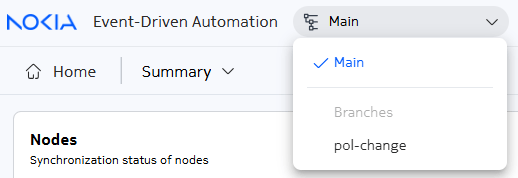
If at least one branch exists, EDA displays a branch indicator and selector at the top of the page. When you are in the main branch, you can use the selector to switch to a different branch.
From a branch cluster UI, you can use the same selector to:
- navigate to the main cluster
- see diffs to identify differences between the current branch and main
- restore the branch from main. This removes all branch changes and applies the latest configuration from main
- rebase the branch from main. This stashes any branch changes as a merge request in the branch cluster, and applies the latest configuration from main
- create a merge request on the main cluster containing the changes from the branch
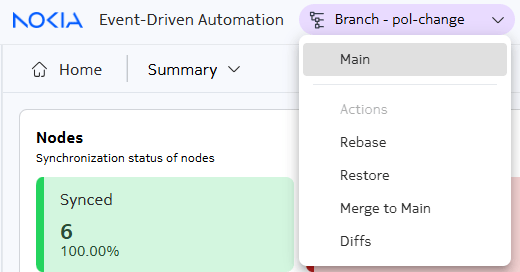
When you are in a branch that is not main, the branch selector is shaded with color as a reminder that you are not in main.
Also, when you are in a branch that is not main, the Branch UI does not show the App management, User management, or Branches CR under Platform.
The Branches page#
The Branches page of the EDA UI can be found by selecting System Administration / Platform / Branches in the EDA navigation menu.
The page displays a list of all current branches.
From this page you can:
- Create a new branch using the Create button.
- As a row action for a branch in the list, do any of the following:
- View the details about a branch (the metadata you entered when creating it).
- Edit the details about a branch
- Duplicate a branch (make a copy, and enter new metadata for the new copy)
- Delete a branch.
Creating a branch#
Follow these steps to create a new branch.
Note
You must be in the main cluster UI to create new branches. You cannot create a new branch from a branch cluster UI.
-
In the System Administration/Platform menu, select Branches.
-
Click Create at the top of the Branches page.
-
On the Create Branch page, enter a Name and, optionally, Labels and Annotations for this branch.
-
If this is a remote branch, enter the name of a
ClusterProvider. -
Do one of the following:
- Click Commit to immediately apply the changes and trigger any configured pipelines for pre- and post-commit tasks.
- Click the drop-down control beside the Commit button and select Commit without pipeline to commit the change immediately without running any pre- or post-commit tasks from any associated pipelines.
- Click the drop-down control beside the Commit button and select Add To Basket to store these changes to be processed later as part of a transaction.
- Click the drop-down control beside the Commit button and select Dry Run to test your changes immediately, and reveal any issues before proceeding.
After you create at least one branch, the Branch Selector control displays at the top of the EDA UI.
Managing a branch#
When you have a branch open other than main, follow these steps to perform actions on that branch.
-
Click the Branch Selector at the top of the EDA UI and select your branch from the displayed list.
EDA opens a new browser tab; in that tab, the UI switches to the selected branch. If you switched to a branch that is not main, the Branch Selector adopts color shading as an indicator that you are not in main.
-
Choose one of the following:
- To update your branch with changes made to main since you first created the branch (or since your last rebase), go to step 3.
- To update your branch to match the current state of main, go to step 4.
- To view the differences between your current branch and main, go to step 5.
- To create a merge request that will merge the changes in your current branch into main, go to step 6.
-
To rebase your branch, do the following:
-
Click the Branch Selector and select Rebase from the action list.
-
Click OK in the resulting confirmation dialog.
EDA updates the current branch with changes that have been made on main since this branch was created, or since it was last rebased. The Transactions page displays, and the list includes the transaction used to rebase your branch and its status. Double-click the transaction row to see details about its execution.
If your branch contains changes, the rebase operation populates them into a merge request in the branch cluster, which must be manually merged in the branch cluster before the rebase can complete. This allows you to resolve any conflicts that may arise during the rebase, and also gives you visibility into what changes from your branch are being reapplied after the rebase.
-
-
To restore your branch, do the following:
-
Click the Branch Selector and select Restore from the action list.
-
Click OK in the resulting confirmation dialog.
EDA updates the current branch to match the current state of main. The Transactions page displays, and the list includes the transaction used to restore your branch and its status. Double-click the transaction row to see details about its execution.
-
-
To view differences between your current branch and main, do the following:
-
Click the Branch Selector and select Diffs from the action list.
EDA displays a Branch Diffs view for your branch, showing where its resource configurations differ from those on main.
-
Optionally toggle between side-by-side and inline view using the buttons at the top right of the view.
-
Click Close to close the Branch Diffs view.
Note
Branch diffs are not removed from the branch until you perform a rebase on the branch.
-
-
To create a merge request to merge your branch into main, do the following:
-
Click the Branch Selector and select Merge to Main from the displayed list.
The Create Merge Request dialog displays.
-
Enter a description for the merge request in the dialog and click Create.
EDA creates a new merge request for this transaction. A new tab opens showing the Merge Requests details page in the main branch.
From here, depending on the state of the merge request, you might be able to proceed immediately with the merge; or you might need to resolve merge conflicts before proceeding. For information about working with merge requests in EDA, see Merge requests.
-
Branches in edactl#
edactl allows you to:
- create branches, using typical
edactl apply(and related) commands withBranchresources - list resources changed in a branch with
edactl branch changed-resources. Add the--diffoption to show the configuration diff for each changed resource, or-o json/-o yamlto control the output format. - trigger a merge request to main with
edactl branch merge. Unlike the UI workflow, this command does not accept a description; the merge request is created with a default description. - trigger a rebase of the branch with
edactl branch rebase - trigger a restore of the branch with
edactl branch restore
To access edactl commands for branches, you must be targeting the branch cluster. The simplest way to do this is to access the eda-toolbox pod in the branch cluster and run edactl commands from there. You can also set up port forwarding to the branch cluster API server and use edactl from your local machine, or you can install edactl directly on your machine and configure it to reach the branch cluster API server.
Note
To generate an EDACONFIG to interact with a branch you may use edactl config generate as usual, with your current Kubernetes context set to the branch cluster. This will generate an EDACONFIG with the correct API server address and credentials to interact with the branch cluster. If the branch cluster is exposed using a different address, you may need to use the --address flag to specify the correct address for the API server.
Branches in "Try EDA"#
Even the KinD-based Try EDA environment supports locally-spawned branches. The KinD Kubernetes cluster is capable of hosting a nested vCluster-powered branch environment for demonstration and development purposes. The following considerations apply:
EXT_DOMAIN_NAMEshould be set to a valid domain or IP address as this will be used to configure the proxy to the branch cluster.- upon branch creation, the
make expose-try-eda-branch BRANCH_NAME=<branch-name>target must be run to enable UI/API access to the branch cluster.
This target needs to be called only once per the named branch. - Up to three branches are supported in the "Try EDA" environment.