Pipelines#
A pipeline is a user-defined workflow for executing a set of pre-commit and/or post-commit jobs.
A pipeline coordinates validation, workflows, and container steps before and after a commit—similar to GitHub Actions and GitLab pipelines—adapted for EDA's transaction model.
A PipelineDefinition custom resource defines a pipeline. When you commit a transaction that matches a definition, EDA runs the pipeline.
Key concepts#
| Term | Description |
|---|---|
PipelineDefinition | The resource that defines a pipeline, including specifications for triggers, jobs, environment, and execution target. |
TransactionPipelineRunner | One runner per transaction; coordinates all pipelines that matched your commit. |
PipelineRun | One run of a PipelineDefinition. |
job | A unit of work defined in a PipelineDefinition, examples include workflow jobs, pod jobs, or reusable pipeline jobs. |
PipelineDefinition structure#
A PipelineDefinition resource has these main sections:
| Section | Required | Purpose |
|---|---|---|
description | No | A short description of what the pipeline does. |
enabled | No | When false, the definition is not validated or eligible to run. The default is false; set to true to activate the pipeline. |
triggers | Yes | When the pipeline runs (resourceTrigger or workflowCall). |
transaction | No | Inputs extracted from changed CRs in the triggering transaction. |
env | No | Environment variables for all jobs. |
jobs | Yes | The work to perform—workflow jobs, pod jobs, or reusable pipeline jobs. |
Example of a PipelineDefinition resource
apiVersion: core.eda.nokia.com/v1
kind: PipelineDefinition
metadata:
  name: deployimage-pipeline
  namespace: eda-system
spec:
  enabled: true
  triggers:
    events:
      resourceTrigger:
        - type: [Update]
          gvk: {group: core.eda.nokia.com, version: v1, kind: TopoNode}
          fields: [spec.version, spec.nodeProfile]
  transaction:
    inputs:
      - name: nodes
        gvk: { group: core.eda.nokia.com, version: v1, kind: TopoNode}
        extract: "metadata.name"
        description: "get nodes field from toponodes"
        required: true
  jobs:
    - name: pre-check-interfaces
      workflow:
        group: interfaces.eda.nokia.com
        version: v1
        kind: CheckInterfaces
      with:
        - name: spec
          value:
            nodes: ${{ transaction.inputs.nodes }}
    - name: pre-check-bgp
      workflow:
        group: protocols.eda.nokia.com
        version: v2
        kind: CheckDefaultBgpPeers
      with:
        - name: spec
          value:
            nodes: ${{ transaction.inputs.nodes }}
    - name: pre-check-isl-ping
      workflow:
        group: fabrics.eda.nokia.com
        version: v1
        kind: IslPing
      with:
        - name: spec
          value:
            count: 10
            timeoutSeconds: 10
            addressFamily: "DualStack"
    - name: pre-check-system-ping
      workflow:
        group: routing.eda.nokia.com
        version: v1
        kind: SystemPing
      with:
        - name: spec
          value:
            nodes: ${{ transaction.inputs.nodes }}
            count: 10
            timeoutSeconds: 10
            addressFamily: "DualStack"
    - name: put-maintenance
      needs: [pre-check-system-ping, pre-check-isl-ping, pre-check-bgp, pre-check-interfaces]
      runsIn: eda-toolbox
      env:
        - name: NODES
          value: ${{ transaction.inputs.nodes }}
      steps:
        - id: resetMode
          run: |
            edactl -n $EDAPL_TRANSACTION_NAMESPACE patch toponodes.core.eda.nokia.com $NODES \
              -p '[{"op": "replace", "path": "/spec/npp/mode", "value": "maintenance"}]'

      # === commit barrier ===

    - name: reboot-and-wait
      needs: [commit]
      uses: wait-for-node-pipeline
      with:
        - name: namespace
          value: "eda"
        - name: nodeSelector
          value: ""
        - name: nodes
          value: ${{ transaction.inputs.nodes }}
        - name: waitFor
          value: 10
    - name: post-check-interfaces
      needs: [reboot-and-wait]
      compareWith: pre-check-interfaces
      if: ${{ needs.reboot-and-wait.outputs.synced == 'true' }}
      workflow:
        group: interfaces.eda.nokia.com
        version: v1
        kind: CheckInterfaces
      allowFailure: true
      with:
        - name: spec
          value:
            nodes: ${{ transaction.inputs.nodes }}
    - name: post-check-isl-ping
      needs: [reboot-and-wait, post-check-interfaces]
      compareWith: pre-check-isl-ping
      workflow:
        group: fabrics.eda.nokia.com
        version: v1
        kind: IslPing
      allowFailure: true
      with:
        - name: spec
          value:
            count: 10
            timeoutSeconds: 10
            addressFamily: "DualStack"
    - name: post-check-system-ping
      needs: [reboot-and-wait, post-check-interfaces, post-check-bgp]
      compareWith: pre-check-system-ping
      workflow:
        group: routing.eda.nokia.com
        version: v1
        kind: SystemPing
      allowFailure: true
      with:
        - name: spec
          value:
            nodes: ${{ transaction.inputs.nodes }}
            count: 10
            timeoutSeconds: 10
            addressFamily: "DualStack"
    - name: post-check-bgp
      needs: [reboot-and-wait, post-check-isl-ping]
      compareWith: pre-check-bgp
      workflow:
        group: protocols.eda.nokia.com
        version: v2
        kind: CheckDefaultBgpPeers
      allowFailure: true
      with:
        - name: spec
          value:
            nodes: ${{ transaction.inputs.nodes }}
    - name: remove-maintenance
      needs: [put-maintenance, post-check-system-ping, post-check-isl-ping, post-check-bgp, post-check-interfaces]
      runsIn: eda-toolbox
      if: ${{ always() && needs.put-maintenance.outcome == 'Success' }}
      env:
        - name: NODES
          value: ${{ transaction.inputs.nodes }}
      steps:
        - id: resetMode
          run: |
            edactl -n $EDAPL_TRANSACTION_NAMESPACE patch toponodes.core.eda.nokia.com $NODES \
               -p '[{"op": "replace", "path": "/spec/npp/mode", "value": "normal"}]'
Pipeline triggers#
Triggers define when a PipelineDefinition runs. A trigger can be a resource trigger (resourceTrigger) or a workflow call workflowCall.
Resource trigger (resourceTrigger)#
A resource trigger runs a pipeline when a transaction changes matching custom resources.
| Field | Setting |
|---|---|
type | Required—a list of one or more of Create, Update, and Delete. |
gvk | Group, version, and kind. Required—an empty GVK is never matched. |
fields | Dot-delimited paths (for example, spec.version). All listed fields must change. Omit to match any change to the GVK. |
labels | Label selectors. All must match. Omit to skip label checks. |
Within one trigger, field and label conditions are combined with AND. Multiple triggers on the same definition are combined with OR.
Example — match when either field changes (OR):
triggers:
  events:
    resourceTrigger:
      - type: [Update]
        gvk: { group: core.eda.nokia.com, version: v1, kind: TopoNode }
        fields: [spec.version]
      - type: [Update]
        gvk: { group: core.eda.nokia.com, version: v1, kind: TopoNode }
        fields: [spec.profile]
Example — match when both fields change (AND):
triggers:
  events:
    resourceTrigger:
      - type: [Create, Update]
        gvk: { group: core.eda.nokia.com, version: v1, kind: TopoNode }
        fields: [spec.version, spec.profile]
One transaction can match multiple PipelineDefinition resources, even across namespaces. All matches run under one TransactionPipelineRunner. While a definition is running, a new run of the same definition triggered by another transaction is queued in the WaitingToStart state until the current run finishes. By default, a queued run fails if it waits for more than 60 minutes.
Note
Pipelines are not run for dry-run transactions.
Reusable pipeline (workflowCall)#
With a workflowCall trigger, another pipeline invokes this definition with uses. Reusable pipelines can be nested up to 10 levels deep. If a referenced PipelineDefinition is missing, the caller is marked invalid with a missing dependencies error, and is automatically re-validated when the missing definition is created.
The workflowCall type defines the contract between caller and callee:
- inputs: parameters the caller must/may provide, types (
String,Number,Boolean),required,isArray,default - outputs: values the callee produces, each with a type/value expression.
spec:
  enabled: true
  triggers:
    workflowCall:
      inputs:
        - name: namespace
          description: 'namespace'
          required: true
          inputType: String
        - name: nodeSelector
          description: 'Node selector'
          required: true
          inputType: String
        - name: nodes
          description: 'nodes whose BGP peers to check'
          required: true
          inputType: String
          isArray: true
        - name: waitFor
          description: 'wait for'
          required: true
          inputType: Number
        - name: status
          description: 'serialized status to compare with'
          required: false
          inputType: String
      outputs:
        - name: synced
          outputType: Boolean
          outputValue: ${{ jobs.wait-for-node.outputs.waitStatus }}
Note
Manual dispatch triggers (for manually starting a pipeline with inputs) are currently not supported.
Transaction inputs#
Under transaction.inputs, define named values to extract from custom resources in the triggering transaction. Reference them in jobs with ${{ transaction.inputs.<name> }}.
Each input specifies:
| Field | Purpose |
|---|---|
name | The unique name of the input |
type | The resource change types (Create, Update, Delete) from which to extract fields. Omit to select all change types |
gvk | Which CRs in the transaction to read |
extract | Dot-delimited field path (for example, metadata.name) |
required | When true, the pipeline fails if no value is found and no default is set |
default | Value to use when extraction yields nothing |
When multiple CRs match the input's GVK, EDA collects all extracted values into a list.
Jobs#
A PipelineDefinition is made up of one or more jobs, which run in parallel by default. To run jobs sequentially, you can define dependencies on other jobs using the jobs.<name>.needs keyword. An EDA built-in job named commit exists, allowing jobs to execute themselves pre- and post-commit.
Declare a list of jobs under spec.jobs. Each item in the list requires a unique name field.
Job types#
| Job type | How EDA runs it |
|---|---|
| Workflow | Set workflow (GVK) and with for the workflow spec. |
| Pod | Set runsIn or container, plus steps. |
| Reusable pipeline | Set uses to another PipelineDefinition with a workflowCall trigger. |
A job uses only one of workflow, runsIn/container, or uses—they are mutually exclusive. A job that sets uses cannot also define steps or outputs.
Note
A container job is currently in alpha state and not supported.
Job fields#
| Field | Purpose |
|---|---|
name | Unique identifier for the job. needs, compareWith and expressions refer to this name. |
description | A short description of the job. |
compareWith | the name of an earlier job running the same workflow to compare results against, typically pre/post commit |
needs | Jobs that must finish first. Include commit for post-commit jobs. |
if | Run the job only when this expression is true. |
env | Job-level environment variables, overriding global values. |
with | A name / value of inputs provided in either workflow or uses type jobs. |
outputs | Values downstream jobs read with ${{ needs.<job>.outputs.<key> }}. |
timeoutMinutes | Job timeout in minutes (default 240). |
allowFailure | When true, a failed job does not stop the pipeline; dependents still run. |
runsIn job steps#
| Field | Purpose |
|---|---|
id | a unique identifier within the job (used for output references). |
name | a display name for the step. |
run | (bash) shell command(s) to execute. |
env | list of step-level environment variables. |
if | conditional expression for the step. |
allowFailure | When true, subsequent steps continue even if this step fails. |
timeoutMinutes | Step timeout in minutes (minimum 1). When omitted, the step has no separate timeout and is limited only by the time remaining on the job timeout. |
Outputs#
Pipelines can pass named string values:
- from one step to a later step in the same job
- from one job to downstream jobs.
Write step outputs to $EDAPL_OUTPUT as name=value lines. Reference them later with ${{ steps.<id>.outputs.<key> }}. A step can only read outputs of earlier steps—not its own, and not one that has yet to occur.
Reference the previous step with ${{ steps.<step_id>.outputs.<key> }} in run, env or if
steps:
  - id: myUpstreamStep
    run: |
      echo "tag=1.2.3" >> $EDAPL_OUTPUT
- id: myDownstreamStep
run: |
echo "deploying ${{ steps.myUpstreamStep.outputs.tag }}"
echo "also accessible through deploying $ENV_TAG"
env:
- name: ENV_TAG
value: "${{ steps.myUpstreamStep.outputs.tag }}"
A job exposes outputs to downstream jobs by mapping named job outputs to step outputs under:
jobs:
  - name: build
    runsIn: eda-toolbox
    outputs:
      - name: tag
        value: ${{ steps.myUpstreamStep.outputs.tag }}
    steps:
      - id: myUpstreamStep
        run: |
          echo "tag=1.2.3" >> $EDAPL_OUTPUT
Phases and commit flow#
For resource-triggered pipelines, EDA partitions jobs automatically into pre-commit and post-commit phases around a commit barrier.
Execution flow:
-
Run all pre-commit jobs in dependency order.
- If any pre-commit job fails, the pipeline fails, post-commit jobs are skipped, and the transaction is not committed.
-
If pre-commit jobs succeed, the transaction commits as described in Transactions.
-
If the commit succeeds, run post-commit jobs.
- Should any of the post-commit jobs fail and
allowFailureis not set, a revertTransactionwill occur.
- Should any of the post-commit jobs fail and
Add commit to needs when a job must run after the commit:
- name: reboot-and-wait
  needs: [commit]
  workflow: { group: components.eda.nokia.com, version: v2, kind: Reboot }
  with:
    - name: spec
      value:
        nodes: ${{ transaction.inputs.nodes }}
        drains:
          skip: true
        prompts:
          skip: true
If no job lists commit in its needs field, the pipeline has no commit barrier: the transaction commit does not depend on the pipeline, and all jobs are considered post-commit.
Pre/post checks and scratchpads#
Run the same workflow before and after the commit to validate a change—for example, pre-check-interfaces and post-check-interfaces.
Pre-check workflows can store results in a scratchpad (arbitrary data keyed by workflow ID). Set compareWith on the post-check job to the pre-check job ID. Both jobs must use the same workflow GVK. EDA passes the pre-check workflow ID to the post-check run so it can read that scratchpad and compare results.
- name: post-check-interfaces
  needs: [reboot-and-wait]
  compareWith: pre-check-interfaces
  workflow: { group: interfaces.eda.nokia.com, version: v1, kind: CheckInterfaces }
Environment variables#
A list of name/value of variables that are available to the steps of all jobs in the PipelineDefinition. You can also set variables that are only available to the steps of a single job or to a single step.
When more than one environment variable is defined with the same name, EDA uses the most specific variable. For example, an environment variable defined in a step will override job and PipelineDefinition environment variables with the same name, while the step executes. An environment variable defined for a job will override a PipelineDefinition global variable with the same name, while the job executes.
Set variables at three levels (most specific wins):
| Level | Field |
|---|---|
| Pipeline | spec.env |
| Job | jobs.<id>.env |
| Step | jobs.<id>.steps[].env |
Names must start with a letter or _, contain only letters, digits, and _, and must not use the reserved prefix EDAPL_. The prefix check is case-sensitive; lowercase names such as edapl_custom are valid.
Default variables#
| Name | Description |
|---|---|
EDAPL_OUTPUT | where to append name=value lines to publish outputs. |
EDAPL_ENV | reserved for future use. |
EDAPL_PIPELINE_ID | integer, set to the current pipeline run id. |
EDAPL_JOB_ID | string, set to the current job-name. |
EDAPL_TRIGGERED_JOB | boolean, true when the job has been started through Pipelines. |
EDAPL_TRANSACTION_NAMESPACE | string, namespace of the transaction which triggered the pipeline run. |
Expressions#
Use ${{ ... }} in env, run, with, if, and outputs.
| Expression | Use it to read |
|---|---|
${{ transaction.inputs.<key> }} | Transaction input values |
${{ needs.<job>.outputs.<key> }} | Output from an upstream job, a missing key resolves to "" |
${{ needs.<job>.result }} | Upstream job result, alias for conclusion |
${{ needs.<job>.conclusion }} | Upstream job result masked by allowFailure (success, failure, or skipped) |
${{ needs.<job>.outcome }} | Upstream job unmasked result |
${{ steps.<id>.outputs.<key> }} | Output from an earlier step in the same job |
${{ steps.<id>.outcome }} | Step unmasked result |
${{ steps.<id>.conclusion }} | Step result, masked by allowFailure |
${{ inputs.<key> }} | Inputs to a reusable pipeline |
${{ env.<var> }} | Environment variable, not available in job-level if |
Operators#
| Operator | Description |
|---|---|
( ) | Logical grouping |
[ ] | Index |
. | Property de-reference |
! | Not |
&& | And |
\|\| | Or |
< | Less than |
<= | Less than or equal |
> | Greater than |
>= | Greater than or equal |
== | Equal |
!= | Not equal |
true | True boolean |
false | False boolean |
null | Null value |
Status functions#
| Function | Description |
|---|---|
success() | true if everything in scope succeeded. |
failure() | true if anything in scope failed. |
always() | true once everything in scope is finished. |
Note
In scope means:
jobs: its listedneedsjobs (including implicit commit).steps: the prior steps in the same job.
If conditions#
You can use the jobs.<name>.if or jobs.<name>.steps[*].if conditional to evaluate a boolean expression. If the boolean condition evaluates to false, the job or step is skipped (not failed), and the rest of the pipeline keeps going.
Note
- A job:
jobs.<name>.ifis evaluated once all of that job's need dependencies have finished. - A step:
jobs.<name>.steps[*].ifis evaluated immediately before that step runs, once the job itself is running.
When no if statement is defined, a job or step behaves as success() and depends on prior (dependent) jobs or all prior steps to be succeeded.
Caution
When an if statement is defined, it is implicitly ANDed with the success() guard, except when status functions are used. Considering the following example:
can never fire because of the implicit success() guard:
to act on a failure, add a status function explicitly:
Skipping pipelines#
You can skip pipelines to make changes without waiting for pipeline completion.
Caution
When you skip pipelines, pre-commit and post-commit jobs do not run. Use this option only when you accept the operational risk.
-
From the UI, select Commit without pipeline from the following operations:
-
Transactions basket
- deleting a resource confirmation prompt
- schema form confirmation prompt
-
merge request confirmation prompt
-
When reverting a transaction from the UI, select Revert without pipeline.
-
In the API, set
skipPipeline: trueon/appsor/transactionPOST requests (the default isfalse). -
In edactl, add the
--skip-pipelineoption, which is available on theedactl apply,replace,create,delete, andpatchcommands, as well as onedactl mr create,edactl mr merge, andedactl mr dry-run.
Pipelines in edactl#
You can monitor pipeline runs using edactl, the Nokia EDA CLI:
-
edactl pipeline: lists all pipeline runners, including their runner ID, the transaction ID that triggered them, and their status. -
edactl pipeline <runner-id>: shows the details of a single pipeline runner, including the jobs of each pipeline, partitioned into their pre-commit and post-commit phases.
Failure scenarios#
If Pipeline Engine or ConfigEngine fails, the outcome depends on the active phase.
| Phase | Component fails | Results |
|---|---|---|
| Pre-commit | PipelineEngine | No transactions are rolled back. Your current commit transaction is not processed. |
| Pre-commit | ConfigEngine | Pre-commit validations fail and the pipeline fails. No rollbacks occur. |
| Commit | PipelineEngine | The commit succeeds, then is rolled back. |
| Commit | ConfigEngine | The commit fails. No rollbacks occur. |
| Post-commit | PipelineEngine | ConfigEngine rolls back your transaction. |
| Post-commit | ConfigEngine | No rollbacks occur. |
Pipeline state#
You can monitor runs in the UI, CLI, or API.
The PipelineRun status includes pipeline state, per-job status, phase status, timestamps, and references to workflows and child pipelines.
Working with pipelines in the UI#
From the Main navigation panel, click Pipelines to view pipeline runs.
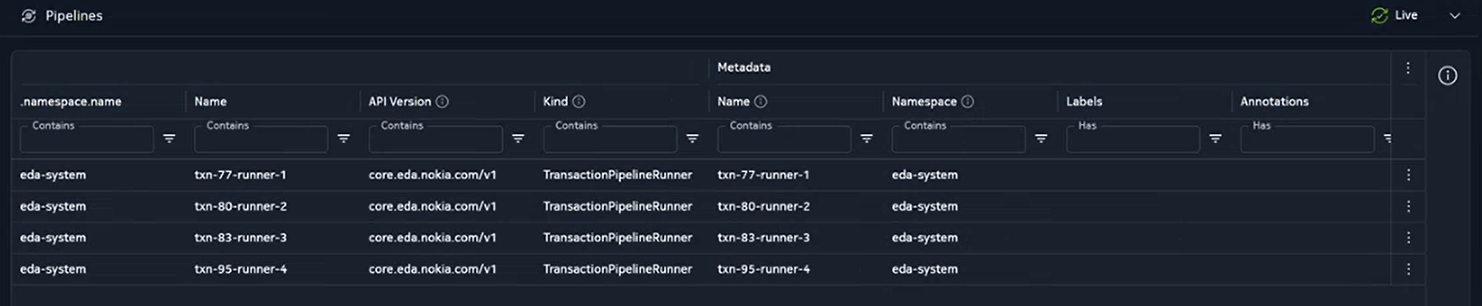
Table: Pipelines page
The Pipelines page displays a datagrid with the following information:
| Column | Description |
|---|---|
| Name | Runner name (for example, tnx-82-runner-1). |
| Namespace | The namespace of the runner. |
| API Version | API group and version of the resource (for example, core.eda.nokia.com/v1). |
| Kind | Resource kind. Pipeline runners are listed as TransactionPipelineRunner. |
| Labels | Labels applied on the runner. |
| State | Run state—one of WaitingToStart, Running, Completed, or Failed. |
| Runner ID | Runtime identifier for the runner (for example, 1). |
| Reason | Why the runner is in this state (for example, PreCommitFailed). |
| Error | Error details when the run fails. |
| Start Time | When the run started. |
| Last Update | When the runner status was last updated. |
| Duration | Elapsed time of the run. |
| Pipeline Runs | Link to the pipeline runs for this runner (for example, 1 item(s)). |
| Transaction ID | Link to the transaction that triggered the run (for example, 82). |
From the Pipelines page, double-click a runner to display the summary for that run or click the transaction ID to go to the transaction that triggered the pipeline.
The Runner Summary page#
The Runner Summary page includes a Runner Summary panel and a Jobs panel.
The Runner Summary panel shows run state, commit result, and links to phase and job details for the selected runner.
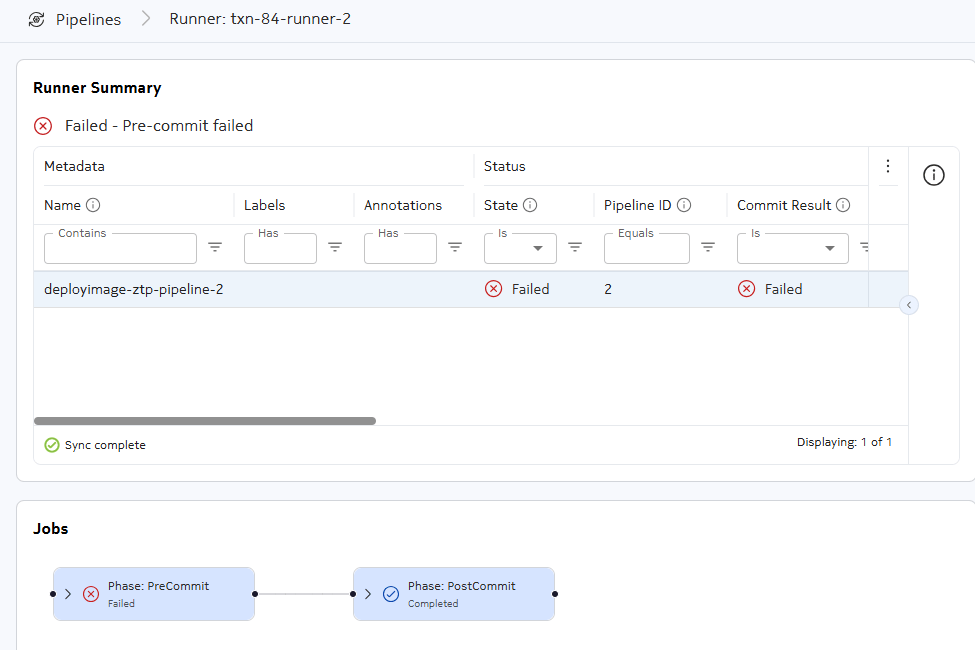
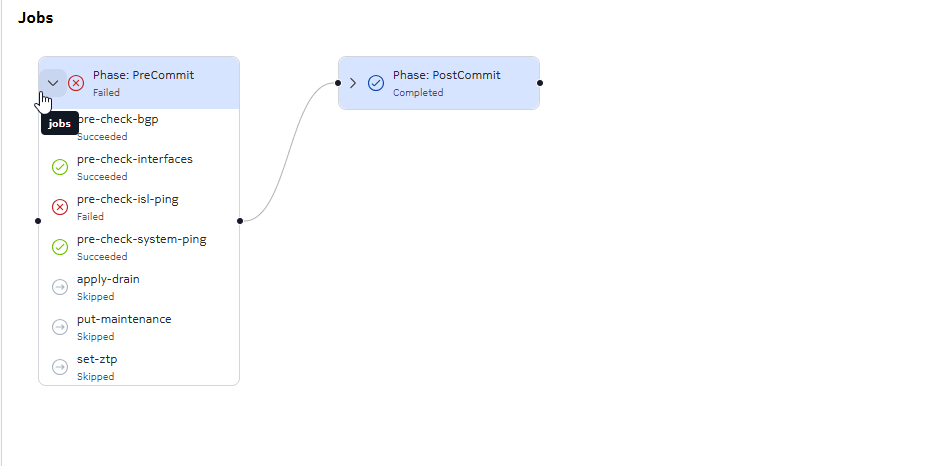
The Jobs panel lists all jobs per phase and whether each job succeeded, failed, or was skipped. Click the expand icon to display all jobs per phase.